




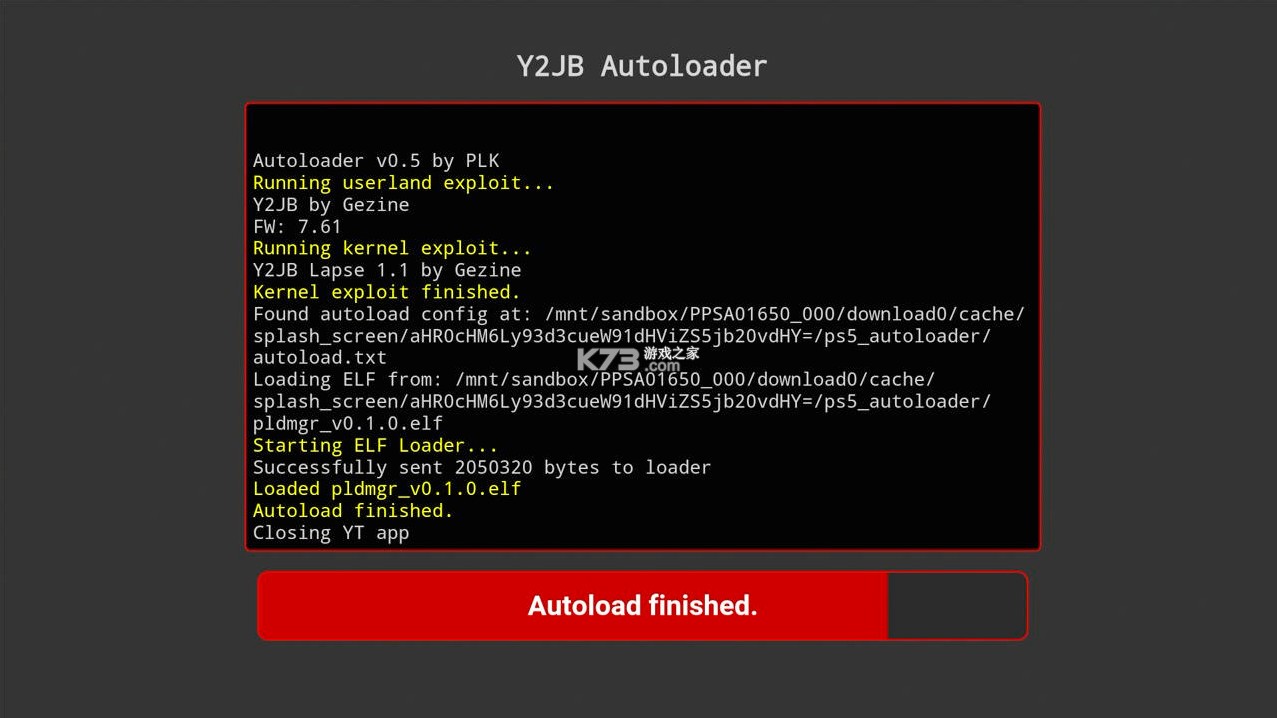
PS5 Y2JB Autoloader是一款针对索尼PlayStation 5主机开发的辅助加载工具,旨在利用ps5漏洞简化和自动化游戏资源的加载过程。该工具主要面向希望更便捷管理游戏文件、体验更多游戏内容的玩家群体。它通过自动化的方式,减少了手动操作步骤,提升了资源加载的效率和便利性。这款工具通常被玩家用于加载备份的游戏资源或进行特定开发测试,其核心价值在于提供了一种更为高效、便捷的资源管理方案。作为一款技术性工具,它在特定用户社群中拥有较高的关注度和实用价值。
| 折腾方案 | 系统版本 | 备注 |
| 方案A (4.03-12.70)【Y2JB Autoloader】 |
4.03-10.01 | |
| 10.02-12.00 (光驱版) | 直接看方案B | |
| 10.02-12.00(数字版)、12.02-12.70 | 每次开机都需要50分钟 | |
| 方案B (4.03-12.00)【BD-JB Autoloader】 | 4.03-12.00(光驱版) | 使用最新的BD-JB Autoloader v1.5.0,傻瓜操作,很快很爽。而且感觉用光盘折腾稳定性比Y2JB更好 |
| 方案C (最高支持12.00) 【WebKit网页Poopxploit破解】 | 最高支持12.00 | 10.02-12.00(数字版)的福音。稳定性肯定不如方案A、方案B,但总好过每次折腾需要等待50分钟。 |
| 1、数据整理截至到2026.8.11 12点50分; 2、更低的系统版本(5.5之前的)还有很多破解方式,未接触过就不一一罗列了。 |
||
- 自动化加载流程,省去手动操作。
- 界面设计直观,易于上手。
- 支持多种资源格式,兼容性好。
- 为开发测试提供便捷环境。
- 社区活跃,教程资源丰富。
如果使用 Y2JB :
1.请将更新后的 ZIP 文件放在以下位置之一:
USB/y2jb_update.zip
USB/ps5_autoloader/y2jb_update.zip
/data/y2jb_update.zip
/data/ps5_autoloader/y2jb_update.zip
注意: 文件名必须完全匹配: y2jb_update.zip
2.启动 Y2JB,发送内核漏洞利用程序(例如 lapse.js )。
注意: 原版 Y2JB 中包含的 lapse.js 文件会在任务完成后自动关闭 YouTube 应用。目前请使用此修改版本: lapse_no_elfldr_not_autoclosing.js
3.发送 update.js 。
该脚本将更新 Y2JB 文件。如果更新成功,它还会删除 y2jb_update.zip 软件包。
如果使用 ps5_y2jb_autoloader:
更新程序已包含在自动加载程序中(自 v0.2 版本起)。
请将更新后的 ZIP 文件放在以下位置之一:
USB/y2jb_update.zip
USB/ps5_autoloader/y2jb_update.zip
/data/y2jb_update.zip
/data/ps5_autoloader/y2jb_update.zip
注意: 文件名必须完全匹配: y2jb_update.zip
autoloader自动加载器在加载内核漏洞利用程序后会自动应用更新。
以下教程为原文+机翻,请英文+中文比对使用(原文机翻,操作为个人行为,操作即代表你已熟知风险,本站不负任何责任):
Userland code execution using the PS5 YouTube app.
利用 PS5 YouTube 应用执行用户空间代码。
Requirements要求:
At least 4.03 firmware PS5
PS5 固件至少需要 4.03 版本
For Jailbroken PS5 (Webkit, Lua, BD-JB) 适用于已越狱的 PS5(Webkit、Lua、BD-JB)
Fake or legit activated PS5
假的还是真的已激活的 PS5
For firmware 4.03 to 12.40 get YouTube app (PPSA01650) version 01.000.003 PKG
适用于固件版本 4.03 至 12.40 的 YouTube 应用 (PPSA01650) 版本 01.000.003 PKG
For firmware 12.60 and up get YouTube app (PPSA01650) version 01.000.030 PKG
适用于固件版本 12.60 及更高版本,请获取 YouTube 应用 (PPSA01650) 版本 01.000.030 PKG
FTP access to the console
通过 FTP 访问控制台
For Non-Jailbroken PS5 适用于未越狱的 PS5
USB flash drive USB 闪存盘
Pre-made backup file 预先制作的备份文件
Setup Instructions 安装说明:
Configure Network DNS Settings (Optional, but highly recommended)
配置网络 DNS 设置(可选,但强烈建议)
Navigate to Settings > Network > Settings > Set Up Internet Connection
依次点击 “设置”>“网络”>“设置”>“设置互联网连接”
Scroll to the bottom and select Set Up Manually
滚动到页面底部,选择 “手动设置”。
Choose your connection type:
选择您的连接类型:
Use WiFi: Enter your network name and password manually, then set security to "WPA-Personal..."
使用 WiFi :手动输入您的网络名称和密码,然后将安全设置设为“WPA-Personal...”
Use a LAN Cable: Proceed to the next step
使用网线 :请继续下一步
Under DNS Settings, change from "Automatic" to Manual
在 DNS 设置中,将“自动”更改为 “手动 ”。
Set Primary DNS to 127.0.0.2 (leave Secondary DNS blank)
将主 DNS 服务器设置为 127.0.0.2 (辅助 DNS 服务器留空)
Press Done and wait for the connection to establish
点击 “完成” 按钮,等待连接建立。
Note: You may see a network/PSN connection error - this is expected and can be safely ignored. The console will still function normally for YouTube payload delivery.
注意: 您可能会看到网络/PSN 连接错误——这是正常现象,可以忽略。主机仍能正常运行,用于 YouTube 视频播放。
Alternative: Instead of using 127.0.0.2, you can block PSN servers using your custom DNS server.
另一种方法: 您可以不使用 127.0.0.2,而是使用自定义 DNS 服务器来屏蔽 PSN 服务器。
Why is Setting DNS to 127.0.0.2 Required?
为什么需要将 DNS 设置为 127.0.0.2?
The DNS configuration is critical for Y2JB to function properly for two technical reasons:
DNS 配置对于 Y2JB 的正常运行至关重要,原因有二:
Blocking PSN Connections: Setting the DNS to 127.0.0.2 (localhost) prevents the PS5 from reaching PlayStation Network servers. This blocks both the YouTube app and system firmware update prompts that would otherwise interfere with the exploit.
阻止 PSN 连接 :将 DNS 设置为 127.0.0.2(本地主机)会阻止 PS5 连接到 PlayStation Network 服务器。这会阻止 YouTube 应用和系统固件更新提示,否则这些提示会干扰漏洞利用。
Fake Account Activation 虚假账户激活:
Note: If you're using the backup file from the releases page, you can skip this section.
注意: 如果您使用的是发布页面上(本下载文件已包含)的备份文件,则可以跳过此部分。
Y2JB requires a fake-activated account to run properly.
Y2JB 需要一个已激活的虚假账户才能正常运行。
Important: If you have a legit PSN-activated account (officially registered through PlayStation Network), you cannot use it directly with Y2JB. You must create and use a separate fake-activated account instead.
重要提示: 如果您拥有合法激活的 PSN 账号(通过 PlayStation Network 官方注册),则无法直接将其与 Y2JB 一起使用。您必须创建一个单独的虚假激活账号并改用。
To fake activate an account:
伪造账户激活:
Create a new offline account on your PS5
在你的 PS5 上创建一个新的离线帐户
While logging in to this new account, open etaHEN toolbox
登录此新帐户时,打开 etaHEN 工具箱
Navigate to the "Remote Play" menu
导航至 “远程播放” 菜单
The account will be automatically fake activated
该账户将自动被虚假激活
Jailbroken PS5 已越狱的 PS5:
Install YouTube app PKG on your PS5
在你的 PS5 上安装 YouTube 应用PKG
Use FTP to access the following path (create if not present):
使用 FTP 访问以下路径(如果不存在则创建):
/user/download/PPSA01650
Download download0.dat from the releases page and send it using FTP
从发布页面下载 download0.dat(本下载文件已包含) ,然后使用 FTP 发送。
Non-Jailbroken PS5 未越狱的 PS5:
Download the backup file from the releases page
从发布页面下载备份文件
Firmware 4.03 – 12.40 → Y2JB_backup_1.6(4.03)
固件 4.03 – 12.40 → Y2JB_backup_1.6(4.03)
Firmware 12.60 and up → Y2JB_backup_1.6(12.20)
固件版本 12.60 及以上 → Y2JB_backup_1.6(12.20)
Follow Sony's official guide to restore backup data from USB
请按照索尼官方指南从USB 恢复备份数据。
⚠️ WARNING: Restoring backup data WILL FACTORY RESET YOUR PS5. All data on your console will be erased.
⚠️ 警告: 恢复备份数据会将您的 PS5 恢复出厂设置 。主机上的所有数据都将被清除。
Blocking YouTube Updates (appinfo_editor.py)阻止 YouTube 更新 (appinfo_editor.py)
⚠️ CRITICAL WARNING: Database corruption can result in the deletion of ALL installed FPKGs and savedata stored on your internal storage. Before proceeding with this section, backup your savedata using the PS5's built-in backup and restore feature in Settings to prevent data loss.
⚠️ 重要警告: 数据库损坏可能导致所有已安装的 FPKG 文件和存储在内部存储器上的存档数据被删除。在继续执行此部分操作之前,请使用 PS5 的内置备份和恢复功能(位于“设置”中) 备份您的存档数据 ,以防止数据丢失。
This script prevents the YouTube app from updating if you accidentally connect to the internet. Allowing updates can cause a softlock that prevents YouTube from launching (see next section for fix instructions).
此脚本可防止 YouTube 应用在您意外连接到互联网时进行更新。允许更新可能会导致软锁,从而阻止 YouTube 启动(请参阅下一节了解修复说明)。
Steps: 步骤:
After installing the YouTube PKG, retrieve /system_data/priv/mms/appinfo.db from your PS5 using FTP
安装 YouTube PKG 后,使用 FTP 从 PS5 上获取 /system_data/priv/mms/appinfo.db 文件。
Place appinfo.db in the same directory as appinfo_editor.py
将 appinfo.db 放在与 appinfo_editor.py 相同的目录中。
Run the script to modify appinfo.db and block YouTube updates:
运行脚本以修改 appinfo.db 文件并阻止 YouTube 更新:
python appinfo_editor.py
Before replacing the file on your PS5 (to avoid database corruption):
在替换 PS5 上的文件之前 (为避免数据库损坏):
Close the YouTube app completely
完全关闭 YouTube 应用
Navigate to the Settings page
导航至“设置”页面
Ensure no packages are currently being installed or updated
请确保当前没有正在安装或更新的软件包。
Use FTP to replace /system_data/priv/mms/appinfo.db with the modified version
使用 FTP 将 /system_data/priv/mms/appinfo.db 替换为修改后的版本
If you don't receive any database corruption notification, reboot your PS5
如果没有收到任何数据库损坏通知,请重启您的 PS5。
How to Escape from YouTube Softlock如何摆脱 YouTube 软锁:
This issue typically occurs when you connect to the internet before setting the 127.0.0.2 DNS (most common with WiFi users).
当您在设置 127.0.0.2 DNS 之前连接到互联网时,通常会发生此问题(WiFi 用户最常见)。
Recovery steps: 恢复步骤:
Once softlocked, connect to the internet normally without custom DNS
一旦出现软锁,无需自定义 DNS 即可正常连接互联网。
Launch YouTube again and deny the system software update popup
再次启动 YouTube,并拒绝系统软件更新弹出窗口。
The YouTube app should now launch successfully
YouTube 应用现在应该可以成功启动了。
Run the jailbreak and load HEN
运行越狱程序并加载 HEN。
Set the DNS to 127.0.0.2 again, then uninstall YouTube
将 DNS 服务器地址重新设置为 127.0.0.2,然后卸载 YouTube。
Follow the Jailbroken PS5 section and Blocking YouTube Updates (appinfo_editor.py) section again
请再次按照 “越狱 PS5” 部分和 “阻止 YouTube 更新 (appinfo_editor.py)” 部分的步骤操作。
Restart your PS5. Done.
重启你的 PS5。完成。
Sending Payloads 发送Payloads:
Note: The Remote JS Server does not always use port 50000. While it typically defaults to port 50000, it may occasionally use a different port - this is normal behavior, not a bug.
注意: 远程 JS 服务器并非总是使用 50000 端口。虽然它通常默认使用 50000 端口,但偶尔也可能使用其他端口——这是正常现象,并非错误。
You can send payloads using payload_sender.py (requires Python).
您可以使用 payload_sender.py 发送有效载荷(需要 Python)。Usage: 用法:
python payload_sender.py <host> <file>
python payload_sender.py <host> <port> <file>
Examples: 例如:
python payload_sender.py 192.168.1.100 helloworld.js
python payload_sender.py 192.168.1.100 50000 helloworld.js
python payload_sender.py 192.168.1.100 9020 payload.bin
Lapse Payload 失效Payload
Firmware Compatibility: Only works up to firmware 10.01
固件兼容性: 仅支持固件版本 10.01 及以下。
After the Lapse payload succeeds, you need to send the HEN or other elf binary to port 9021. You can use any TCP payload sender such as:
Lapse 有效载荷发送成功后,您需要将 HEN 或其他 elf 二进制文件发送到端口 9021。 您可以使用任何 TCP 有效载荷发送器,例如:
netcat
payload_sender.py
Example: 例子:
python payload_sender.py 192.168.1.100 9021 hen.bin
以下教程为原文+机翻,请英文+中文比对使用(原文机翻,操作为个人行为,操作即代表你已熟知风险,本站不负任何责任):
Automatically loads the kernel exploit and your elf payloads.
自动加载内核漏洞利用程序和您的 elf 有效载荷。
Supports PS5 firmwares 4.03-12.70
支持 PS5 固件 4.03-12.70
How to Use 如何使用:
There are two ways to use the autoloader:
使用自动加载器有两种方法:
Option 1: Payload Manager
选项 1:有效载荷管理器
If no autoload.txt config is found, the autoloader will automatically launch Payload Manager — a fully-featured PS5 payload manager with a web UI. This lets you configure and send payloads directly from your browser, without needing to manually set up config files or transfer ELF files ahead of time.
如果未找到 autoload.txt 配置文件,自动加载器将自动启动 Payload Manager—— 一个功能齐全的 PS5 有效载荷管理器,带有 Web 用户界面。这使您可以直接通过浏览器配置和发送有效载荷,而无需事先手动设置配置文件或传输 ELF 文件。
Just run the autoloader — if there's nothing configured, Payload Manager starts automatically.
只需运行自动加载器——如果没有进行任何配置,有效载荷管理器将自动启动。
Note: Payload Manager also has its own built-in autoload feature, which lets you configure payloads to load automatically on startup — all managed through its web UI. This is separate from the autoload.txt mechanism described below.
注意: 有效载荷管理器也内置了自动加载功能,允许您配置有效载荷在启动时自动加载——所有操作均可通过其 Web 用户界面完成。这与下文所述的 autoload.txt 机制不同。
⚙️ Option 2: Manual Config (autoload.txt)
⚙️选项 2:手动配置( autoload.txt )
For a fixed, automated payload chain, you can configure payloads manually:
对于固定的、自动化的有效载荷链,您可以手动配置有效载荷:
Create a directory named ps5_autoloader.
创建一个名为 ps5_autoloader 的目录。
Inside this directory, place your .elf / .bin files, and an autoload.txt file.
在这个目录下,放置你的 .elf / .bin 文件和一个 autoload.txt 文件。
In autoload.txt, list the files you want to load, one filename per line.
在 autoload.txt 中,列出要加载的文件,每行一个文件名。
Filenames are case-sensitive — ensure each name exactly matches the file.
文件名区分大小写——请确保每个名称与文件完全匹配。
You can add lines like !1000 to make the loader wait 1000 ms before sending the next payload.
您可以添加类似 !1000 行,使加载器在发送下一个有效载荷之前等待 1000 毫秒。
Put the ps5_autoloader directory in one of these locations (priority order - highest first):
将 ps5_autoloader 目录放在以下位置之一(优先级顺序 - 最高优先级在前):
Root of a USB drive
U 盘根目录
Internal drive: /data/ps5_autoloader
内部驱动器: /data/ps5_autoloader
Note: When an autoload.txt config is found, Payload Manager is not launched automatically. If you also want Payload Manager available, place pldmgr.elf in your ps5_autoloader directory and add it to autoload.txt.
注意: 如果找到了 autoload.txt 配置,有效载荷管理器不会自动启动。如果您也希望有效载荷管理器可用,请将 pldmgr.elf 放在 ps5_autoloader 目录中,并将其添加到 autoload.txt 中。
How to Update 如何更新:
Since version v0.2, you can update the autoloader by simply placing y2jb_update.zip (from the Releases page) on the root of a USB drive, and starting the app.
从版本 v0.2 开始,只需将 y2jb_update.zip (本下载包已包含 )放在 USB 驱动器的根目录 ,然后启动应用程序,即可更新自动加载器。
Setup Instructions 安装说明:
Installation is the same as the original Y2JB (remote loader).
安装方式与原版 Y2JB (远程装载机)相同。
Jailbroken PS5 (Webkit, Lua, BD-JB):
已越狱的 PS5(Webkit、Lua、BD-JB):
Install the correct YouTube version for your firmware:
安装与您的固件兼容的 YouTube 版本:
For firmware 4.03 to 12.40 get YouTube app (PPSA01650) version 01.000.003 PKG
适用于固件版本 4.03 至 12.40 的 YouTube 应用 (PPSA01650) 版本 01.000.003 PKG
For firmware 12.60 and up get YouTube app (PPSA01650) version 01.000.030 PKG
适用于固件版本 12.60 及更高版本, 请获取 YouTube 应用 (PPSA01650) 版本 01.000.030 PKG
(Note: PPSA01651 and PPSA01652 from different regions also work)
(注:不同地区的 PPSA01651 和 PPSA01652 也适用)
Use FTP to place download0.dat from releases page in /user/download/PPSA0165*
使用 FTP 将发布页面上的 download0.dat 放置在 /user/download/PPSA0165* 下
Non-Jailbroken PS5 未越狱的 PS5:
You might find a system backup with pre-configured Autoloader (I don't distribute such backups).
你可能会找到一个预配置了自动加载器的系统备份(我不分发此类备份)。
You can also restore Y2JB (remote loader) system backup, and then:
您还可以恢复 Y2JB (远程加载器)系统备份,然后:
install Autoloader over it by using y2jb_updater
使用 y2jb_updater 将其安装为 Autoloader。
or use FTP to place download0.dat from releases page in /user/download/PPSA01650
或者使用 FTP 将发布页面上的 download0.dat 放置在 /user/download/PPSA01650 下。
or install separate YT app from different region, and use FTP to place download0.dat from releases page in /user/download/PPSA0165*
或者从其他地区安装单独的 YouTube 应用,并使用 FTP 将发布页面上的 download0.dat 放置在 /user/download/PPSA0165* 目录下。
Additional Info 附加信息:
How to have different autoload configs for multiple YT apps?
如何为多个 YouTube 应用设置不同的自动加载配置?
If you want to use multiple YT apps from different regions, name your directory ps5_autoloader_[TITLE_ID], e.g. ps5_autoloader_PPSA01650 this will allow you to have different autoload.txt files for each app (these directories always take precedence over the generic ps5_autoloader directory)
如果您想使用来自不同地区的多个 YouTube 应用,请将您的目录命名为 ps5_autoloader_[TITLE_ID] ,例如 ps5_autoloader_PPSA01650 这样,每个应用程序就可以拥有不同的 autoload.txt 文件。 (这些目录始终优先于通用的 ps5_autoloader 目录)
How to use custom ELF Loader version?
如何使用自定义 ELF 加载器版本?
By default, the autoloader uses a custom version of elfldr that only accepts connections from the PS5 itself (localhost). This improves security by preventing other devices on your network from sending payloads to your console.
默认情况下,自动加载器使用自定义版本的 elfldr,该版本仅接受来自 PS5 主机(本地主机)的连接。这可以防止网络上的其他设备向您的主机发送恶意代码,从而提高安全性。
If you want to use a "normal" ELF Loader that allows sending payloads from any device:
如果您想使用允许从任何设备发送有效载荷的“普通”ELF 加载器:
Place your custom ELF Loader (e.g. elfldr.elf) in the ps5_autoloader directory.
将你的自定义 ELF 加载器(例如 elfldr.elf )放在 ps5_autoloader 目录中。
Add elfldr.elf to your autoload.txt.
将 elfldr.elf 添加到您的 autoload.txt 中。
Note: If you are loading other payloads right after elfldr.elf in your autoload.txt, add a sleep command immediately after it (like !4000 to sleep for 4 seconds) to give the new ELF Loader time to start up and listen before subsequent payloads are sent.
注意:如果您在 autoload.txt 中紧接着加载 elfldr.elf 之后的其他有效载荷,请立即在其后添加一个 sleep 命令(例如 !4000 以休眠 4 秒),以便让新的 ELF 加载器有时间启动和监听,然后再发送后续的有效载荷。
Example autoload.txt:
示例 autoload.txt :
# Load custom ELF Loader
elfldr.elf
# Give it 4 seconds to start up (only needed if sending more payloads)
!4000
# Send other payloads
etaHEN.elf
Y2JB Autoloader
v0.9.1更新日志
更新日志:
为 Y2JB 用户空间漏洞利用程序添加了对 YouTube 01.009.253(最低固件版本 13.40)的支持(感谢 @Gezine)。
注意:这只是为了将来做准备;仍然需要内核版本高于 12.70 的漏洞利用程序。
elfldr 更新至 v0.24。
unified-autoloader 更新至 v0.1.3。
包含捆绑的 Payload Manager v0.5.1(之前为 v0.3.1)。
Y2JB
v1.6更新日志
新增对 12.60 及更高版本固件的支持
新增对远程 JS 加载器的有效载荷验证
更新 elfldr 以支持 13.40 版本
固件 4.03 – 12.40 → Y2JB_backup_1.6(4.03)
固件 12.60 及更高版本 → Y2JB_backup_1.6(12.20)
这里有很多的游戏工具,支持下载各种游戏工具,包括游戏抽卡模拟器、游戏下载工具、游戏安全工具、游戏弹琴助手等等,帮助玩家们更好的进行游戏的挑战与体验。
 下载
下载
Rotating Art Launcher 105.11 MB | 游戏启动器
 下载
下载
Warframe 30.11 MB | 官方助手安卓版(Warframe Companion)
 下载
下载
炉石传说盒子 122.71 MB | 下载安卓版
 下载
下载
第五人格抽奖模拟器 695 KB | 下载安装免费
 下载
下载
弈可软件库 11.55 MB | 下载最新版本
 下载
下载
鸡蛋铺 57.2 MB | 官方版下载
 下载
下载
多玩我的世界盒子3.1.8 28.48 MB |
 下载
下载
ps5 WebKit网页Poopxploit破解工具 7.64 MB | 下载(支持12.00系统)
手机系统工具可以对系统内部进行深度清洁和故障排除的软件,旨在消除运行中累积的冗余数据和潜在问题。这些软件能够执行诸如木马查杀、插件清理、漏洞修复等核心任务,以确保系统的安全无虞。还有手机体检功能,对手机进行全面检查,识别并处理潜在问题。
 下载
下载
Power apps 121.65 MB | 免费安卓版下载
 下载
下载
蚂蚁bms 58.59 MB | 保护版官方下载(ANT BMS)
 下载
下载
超级岛pro 40.98 MB | 安装包
 下载
下载
超级岛pro 40.98 MB | 最新版下载
 下载
下载
zhang3tool 1.92 MB | 官方正版下载免费
 下载
下载
蓝河工具箱 4.54 MB | 最新版本
下载
ps5 WebKit网页Poopxploit破解工具 7.64 MB | 下载(支持12.00系统)
![ps5破解工具整合包下载[附图文教程]](http://pic1.k73.com/k73/mb/up/soft/2026/0812/140017_64338515_60_60.jpg "ps5破解工具整合包下载[附图文教程]") 下载
下载
ps5破解工具整合包 2.3 GB | 下载[附图文教程]
手机游戏辅助,作为针对特定游戏的智能助手与增强工具,如《王者荣耀》的专属伴侣“王者营地”,为《英雄联盟手游》玩家打造的“掌上联盟”,以及《原神》爱好者信赖的“米游社”,它们均属于为提升玩家体验而精心设计的手机游戏辅助应用。
下载
Rotating Art Launcher 105.11 MB | 游戏启动器
下载
Warframe 30.11 MB | 官方助手安卓版(Warframe Companion)
 下载
下载
我的世界奥特曼传说 521.22 MB | 木鱼下载
 下载
下载
小熊猫多队版 5.26 MB | app下载
 下载
下载
八门神器 83.79 MB | 官方正版下载
 下载
下载
葫芦侠 35.5 MB | 破解版下载最新版安全下载
 下载
下载
termux:x11 13.66 MB | 手机版
 下载
下载
Xbox 37.96 MB | 免费版(Xbox Game Pass)
下载
ps5 WebKit网页Poopxploit破解工具 7.64 MB | 下载(支持12.00系统)
下载
ps5破解工具整合包 2.3 GB | 下载[附图文教程]
 下载
下载
PS5 Y2JB Autoloader 1.53 GB | 最新版下载
ps5在其生命的末期终于迎来了破解,你可以使用各种内核漏洞、elf、Y2JB、BDJB、Lua、Payload、WebKit网页Poopxploit等丰富的方式对主机进行注入破解,这让ps5距离完美破解已经快要达成了。这里给大家分享了各种ps5破解相关工具的下载整合包及相关教程,让大家玩转ps5。
下载
ps5 WebKit网页Poopxploit破解工具 7.64 MB | 下载(支持12.00系统)
下载
ps5破解工具整合包 2.3 GB | 下载[附图文教程]
 下载
下载
PS5调试菜单bdj-ipv6-hen 4.05 MB | 下载
 下载
下载
PS5 Payload SDK 8.41 MB | 下载最新版
 下载
下载
PS5内核漏洞3.xx / 4.xx 76 KB | 下载
 下载
下载
PS5调试工具ps5debug-NG 999 KB | 下载
 下载
下载
PS5漏洞加载工具ps5 payload dev elfldr.elf 95 KB | 下载
 下载
下载
PS5存档管理器 120 KB | 下载最新版
 鸿蒙4.0申请入口
鸿蒙4.0申请入口?鸿蒙4.0怎么申请?目前华为的鸿蒙4.0正在火热的内测中,有很多的小伙伴们都想在自己的手机上体验华为最新的鸿蒙系统,那么如何才能申请到测试资格呢,这里为用户们带来详细的攻略介绍。
发布日期:2023-08-23 14:36:55我要评论 查看全部评论 (1)>>

 绝地求生未来之役
 地铁逃生
地铁逃生 pubg
pubg 小七折扣平台
 荣耀应用市场
![ps5破解工具整合包下载[附图文教程]v1.6](http://pic.k73.com/up/soft/2026/0812/140017_64338515.jpg "ps5破解工具整合包下载[附图文教程]v1.6")


![wiliwili下载[switch看bilibili自制客户端]v1.6.0](http://pic.k73.com/up/soft/2026/0427/154023_51580112.jpg "wiliwili下载[switch看bilibili自制客户端]v1.6.0")










k73玩家2026-08-11 19:50:12评论 (4) (0) 回复